In The Ring Fitness came to us with an idea and nothing else. No name, no registered entity, no logo, no website, no photos, no social handles. Just a trainer with a boxing background, a plan to travel to clients across Hudson County, and a decision to start properly instead of stitching something together later. Most fitness marketing work begins with an existing business that needs more attention. This one began before the business existed at all.
Today In The Ring Fitness is a mobile personal training operation serving Hoboken, Jersey City, and the surrounding Hudson County towns. The trainer goes to the client — apartment gyms, home setups, parks — with boxing-derived conditioning at the center of the programming. There is no facility, no front desk, no membership wall. That come-to-you model is the entire value proposition, and everything we wrote, designed, and shot had to carry it.
Why the Usual Fitness Marketing Playbook Didn’t Apply
The standard approach assumes a few things are already in place: a name people can search, a location that anchors you on a map, a few photos, some reviews. We had none of it. Before anyone could look for a personal trainer in Hoboken NJ and find this business, the business had to exist — legally, visually, and on the open web.
There was a second problem underneath that one. A mobile trainer has no address. Most gym marketing leans hard on a physical location: the storefront, the parking, the neighborhood you’re on the corner of. Strip that away and the positioning has to do the work the building normally does. Every line of copy had to make the come-to-you model the reason to call, not a caveat.
Name First, Then the Entity
We developed and vetted name options built around local search intent, then checked them against what was actually obtainable. A name is only useful if you can own the domain and the handles that go with it. We landed on In The Ring Fitness and secured the domain and social handles before anything was filed.
From there we supported the business formation itself. We identified the correct NAICS classification and wrote the company purpose statements used on the NJ-REG registration. It is not glamorous work and it is not what people expect from a marketing agency, but a business that isn’t registered can’t collect payments, can’t claim a Google Business Profile, and can’t be marketed. We’d rather handle it than wait on it.
A Brand Built on Boxing, and Photographed Rather Than Purchased
With the entity in place, we built the identity. The palette is slate, off-white, near-black, and red. The design language is boxing-derived — the visual vocabulary of the sport the programming comes from, not generic gym aesthetics. We built a type system to hold it together and extended the identity into branded apparel for training tees and gear the trainer and clients wear on session.
Then we ran a photo shoot. Training shots, equipment, lifestyle frames — a real image library used across the site and social. Nothing on this brand runs on stock photography, and that matters more for a mobile trainer than it would for a facility. When there’s no gym to walk into, the photos are the only proof of what a session actually looks like.
This wasn’t a logo refresh. It was a ground-up brand build.
Five Pages, Each Built for Its Own Job
We built five pages: Home, Personal Training, About, Pricing & Memberships, and Contact. Each interior page was architected with its own section structure rather than dropped onto a repeating template stack, because Pricing has a different job than Contact and shouldn’t be shaped like it. Layouts were designed to move a first-time visitor from understanding the mobile training model to filling out the inquiry form without a detour.
We wrote every word on the site ourselves, plus the Google Business Profile description, the social bios, and the long and short-form business descriptions. All of it is built around the come-to-you model instead of a location, so the positioning reads the same whether someone finds the business through search, Instagram, or a referral.
Visibility Without an Address
Every page shipped with hand-written title and meta description tags targeting Hoboken, Jersey City, and Hudson County. We wrote the Google Business Profile so a mobile personal trainer in Hoboken surfaces in local results without a storefront to point at, and we run paid search against high-intent local queries for personal training across Hoboken and the surrounding towns, pointing that traffic to the Personal Training and Pricing pages that were built to convert it.
The brand launched in 8 weeks — 1 full brand launch, from no name to a live site with photography behind it. In the first 72 hours the business collected 15 new reviews. In month one, 8 new clients.
We continue to manage the site: updating training and membership content, keeping the photography library in rotation, and adjusting page copy as the service offering and coverage area develop.
If You’re Starting From the Same Place
If you’re standing where this client was — an idea, a skill set, and nothing built yet — start with the name and check availability before you get attached to it. Register the entity properly. Get real photos of yourself working, because in personal training the images are the product demo. Then build the site, and write the pages around what makes you different from the gym down the street rather than around the fact that you’re not one.
If you’re launching a training business in Hoboken or anywhere in Hudson County and want a second opinion on where to start, book a consultation with us.
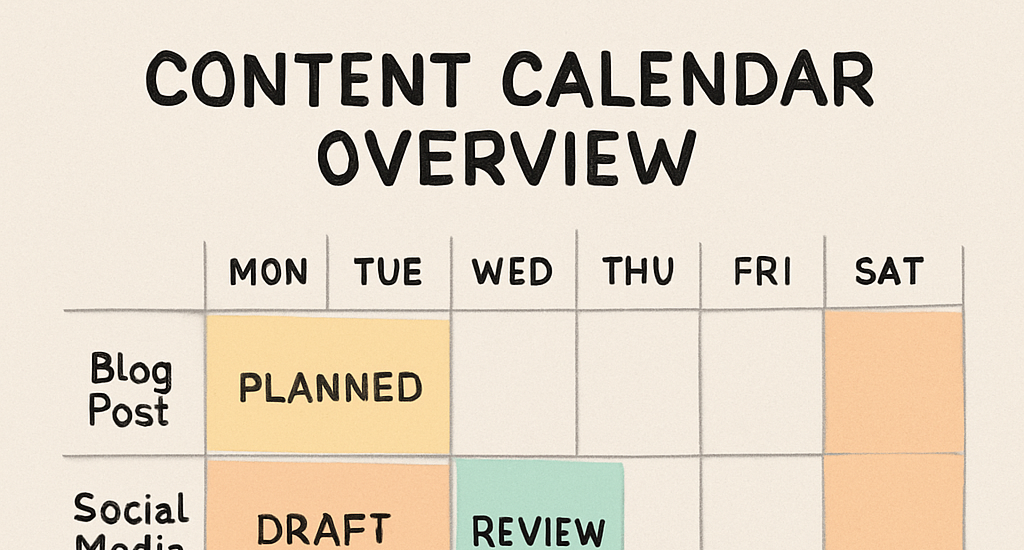
A Simple Content Calendar Template + How to Use It
Creating content can be overwhelming without a plan. That’s where a content calendar comes in handy.
A content calendar is a tool to organize and schedule your content. It helps maintain consistency across platforms.
With a simple content calendar template, you can streamline your content strategy. This includes social media and editorial planning. Think of it as a flexible content strategy template that keeps ideas, channels, and owners aligned.
Using a content calendar ensures your content aligns with business goals. It also aids in resource allocation and time management.
A well-structured calendar can improve team collaboration. It provides a clear overview of upcoming content.
It also helps track content performance and make data-driven decisions. This is crucial for optimizing future content.
In this guide, we’ll explore how to create and use a content calendar. You’ll learn to enhance your content strategy effectively. If you’re looking for a simple content calendar template + how to use it, you’ll find both outlined step by step.
Let’s dive into the world of content calendars and transform your content planning process.
What Is a Content Calendar and Why You Need One
A content calendar is a strategic tool. It helps plan, organize, and schedule content. This includes blog posts, social media updates, and more.
Content calendars are essential for maintaining consistency. They ensure timely content publication across all platforms. Consistency is key for building and engaging an audience.
Using a content calendar aligns your content with business objectives. It also aids in tracking content performance. This makes it easier to measure success and make necessary adjustments. Depending on your needs, it can double as an editorial calendar template or a social media calendar to standardize planning across channels.
Key Features of a Content Calendar:
Details like content type and publication date.
Assigned team members responsible for content.
Platforms or channels for distribution.
A content calendar helps identify content gaps and opportunities. This allows for better planning and repurposing existing content. It supports long-term strategy development.
Incorporating a content calendar in your workflow can transform your content marketing efforts. It provides clarity and focus, keeping your strategy on track.
Key Benefits of Using a Content Calendar
A content calendar streamlines your content strategy. It ensures a cohesive approach to content creation and distribution. By using a calendar, you can stay ahead of deadlines.
One major benefit is improved collaboration. Team members can see what content is in the pipeline. This clarity reduces confusion and enhances productivity.
A content calendar also boosts consistency. Regular posting builds trust and keeps the audience engaged. Maintaining a reliable schedule is easier with a well-planned calendar.
Benefits Summary:
Aligns content with strategic goals
Enhances team collaboration
Improves content consistency
Aids in identifying content gaps
Furthermore, content calendars offer insights into content performance. They enable tracking metrics, allowing for informed decisions. This data-driven approach optimizes future content efforts.
In essence, a content calendar is a roadmap. It guides your content journey and strengthens your brand presence.
Types of Content Calendars: Editorial, Social Media, and More
Content calendars come in various types. Each serves a unique purpose in content planning. Understanding these can enhance your strategy.
An editorial calendar is for written content. It includes blog posts, articles, and newsletters. Editors use it to plan publication schedules. Using an editorial calendar template helps you replicate your workflow month after month and maintain standards.
A social media calendar focuses on platforms like Instagram and Twitter. It schedules posts and campaigns. Managing social media without it can be chaotic.
Different teams may need tailored calendars. For comprehensive planning, consider combining different types. This ensures no platform is overlooked.
Types of Content Calendars:
Editorial calendar
Social media calendar
Campaign-specific calendar
Using multiple calendars can harmonize efforts across channels. This approach ensures message alignment. Together, these can roll up into a single content strategy template for end-to-end planning.
Finally, explore specialized tools for each calendar type. These can offer additional features and flexibility.
by 2H Media (https://unsplash.com/@2hmedia)
Essential Elements of a Simple Content Calendar Template
A content calendar template should be straightforward. Simplicity ensures ease of use. Focus on essential elements for effectiveness.
Include key information such as content type. This defines whether it’s a blog post or social media update. Clarity at this stage is vital.
Specify platforms for each piece of content. Knowing where content will go streamlines creation and distribution. Match content type to the correct platform for best results.
Assign team members to tasks. This clarifies who handles each aspect. Everyone understands their role, which boosts collaboration.
Essential Elements to Include:
Content type
Publication date
Platform
Assigned team member
Customizing your template is important. Tailor it to your needs and objectives for the most impact.
by Mille Sanders (https://unsplash.com/@millesanders)
Step-by-Step: How to Create Your Content Calendar Template
Creating a content calendar template can be transformative. Follow these steps for a seamless process.
Start by defining your content goals. Understanding your objectives lays the foundation. It dictates the type of content you need.
Next, audit your existing content. Evaluate what you’ve already produced. Identify any gaps or areas for improvement.
Choose the right tools for your template. Options include Google Sheets, Excel, or specialized software. Select based on your team’s workflow.
Customize your calendar structure. Make it fit your unique needs. This ensures it serves your strategy effectively.
Keep it simple but functional. Focus on usability for all team members. A complex design can hinder adoption.
Review and refine regularly. Update the calendar as your strategy evolves. This keeps it aligned with your goals.
Involve your team in the creation process. Incorporating feedback improves buy-in and utility. Team collaboration increases calendar effectiveness.
by Zhuo Cheng you (https://unsplash.com/@benjamin_1017)
1. Define Your Content Goals and Objectives
Start by clarifying your content goals. Goals shape your content strategy. They influence content types and platforms.
These may include increasing brand awareness or boosting engagement. Each goal requires different approaches.
Create a list of your objectives. Match each goal with a relevant strategy. This ensures every content piece contributes purposefully.
2. Audit Existing Content and Identify Gaps
Begin with a thorough content audit. Review what content you already have. Assess its performance and relevance.
Identify gaps in your current content library. Gaps highlight opportunities for new content creation. They also indicate areas needing updates or changes.
Compile a list of content needs. Use this to prioritize upcoming projects. Addressing gaps strengthens your overall strategy.
3. Choose Your Tools: Sheets, Excel, or Software
Selecting the right tools is crucial. Google Sheets offers simplicity and accessibility. Excel provides more advanced features.
Specialized software can offer enhanced functionality. Choose based on your team’s technical comfort and requirements.
Consider the following options:
Google Sheets
Microsoft Excel
Content management software
by Behnam Norouzi (https://unsplash.com/@behy_studio)
4. Customize Your Calendar Structure
Tailoring your calendar structure is essential. Design it to fit your unique workflow. Personalization enhances its effectiveness.
Adjust elements like color-coding for clarity. This can differentiate content types or platforms. Visual aids improve usability and quick understanding.
Ensure your structure includes:
Color-coding systems
Customized categories
Platform-specific details
Periodically review and adjust. A flexible structure remains effective as needs evolve. Continuous improvement keeps it aligned with your strategy.
by wd toro 🇲🇨 (https://unsplash.com/@wdtoro)
How to Use Your Content Calendar Effectively
Using your content calendar effectively is key to successful content planning. Start by integrating it into your regular workflow.
Make sure everyone involved understands their role. Clear communication prevents misunderstandings and ensures smooth execution.
Regularly review the calendar’s upcoming tasks. This helps keep everyone on track and prevents last-minute rushes.
Implement lists for better organization:
Scheduled content
Content in development
Completed content
Optimize your strategy based on past performance. Use analytics to adjust and refine your approach.
We offer a free content calendar template to get you started. This tool will simplify your content planning process significantly. It can serve as a content strategy template, an editorial calendar template, and a social media calendar in one place.
Download the template and customize it to fit your needs. Ensure it aligns with your specific content goals.
Key features of the template include:
Easy-to-use interface
Customizable fields
Integration support
The walkthrough explains each section of the template. Follow it to fully understand how to populate and manage your calendar.
Using the template, you can plan effectively and avoid overlooking crucial deadlines. It brings structure and clarity to your content strategy.
by Behnam Norouzi (https://unsplash.com/@behy_studio)
Feel free to share the template with your team. It’s designed to improve collaboration and productivity.
by Marielle Ursua (https://unsplash.com/@heyimmarielle_03)
Tips for Maintaining and Updating Your Content Calendar
Regular updates to your content calendar are vital. Consistency ensures your content stays relevant and timely.
Set aside time weekly to review your calendar. This helps you adapt to changes quickly.
Use the following tips to maintain your calendar:
Schedule regular review meetings
Update content based on performance data
Be flexible to accommodate new trends
by Behnam Norouzi (https://unsplash.com/@behy_studio)
Involve your team in the update process. Collaborative input can provide valuable insights and creativity.
A dynamic calendar supports a proactive content strategy. Stay ahead by anticipating and adjusting to market trends.
Common Mistakes to Avoid with Content Calendars
A well-maintained content calendar aids in efficient content management. However, common mistakes can undermine its effectiveness.
Avoid these errors to maximize your calendar’s potential:
Overloading with too many tasks
Ignoring regular updates
Failing to align content with goals
by Road Ahead (https://unsplash.com/@roadahead_2223)
Stay organized by focusing on realistic scheduling. Prioritize quality over quantity in your content planning. Consistent evaluation and adjustments prevent falling behind in your strategy.
Integrating Your Content Calendar with Other Marketing Tools
Integrating your content calendar with marketing tools streamlines your workflow. It enhances visibility and performance tracking across platforms. This synergy boosts your overall strategy.
Consider integrating these tools:
Social media management platforms
Email marketing tools
Analytics software
by Hakim Menikh (https://unsplash.com/@grafiklink)
When synced with these tools, your content calendar becomes a dynamic resource. It allows real-time updates and insights into content effectiveness. This integration fosters informed decisions and timely responses to trends.
Final Thoughts: Building a Consistent Content Strategy
A consistent content strategy requires planning and flexibility. A content calendar is a tool that helps maintain a steady flow of content. It also adapts to changes as they happen.
To ensure consistency in your strategy, remember to:
Regularly update your calendar
Monitor content performance
Align content with audience needs
Harness the power of your content calendar. Let it guide your efforts, keep your team focused, and your content strategy aligned with your goals.
Digital marketing is crucial for small businesses aiming for success. It’s not just a trend; it’s a necessity.
Traditional marketing methods can be costly. Digital marketing offers more affordable options with a broader reach.
It enables precise targeting, allowing businesses to reach their ideal customers. This reduces wasted marketing spend.
Digital platforms provide tools to personalize marketing efforts. Personalization increases customer engagement and satisfaction.
There’s also the benefit of measurable results. Businesses can track ROI and adjust strategies accordingly.
Key reasons why digital marketing matters:
Levels the playing field with large competitors
Provides cost-effective marketing solutions
Offers precise targeting and personalization
Allows for measurable results and data-driven strategies
Increases customer engagement and brand loyalty
Digital marketing transforms how small businesses connect with customers. Embracing it opens new avenues for growth and innovation.
Setting Clear Digital Marketing Goals
Successful digital marketing begins with clear goals. These goals guide your strategy and measure success.
Start by identifying what you want to achieve. This could be increasing website traffic or boosting sales.
Define specific, measurable, achievable, relevant, and time-bound (SMART) goals. This approach ensures focus and clarity.
Consider these goals for your digital marketing efforts:
Increase website visits by 25% in six months
Grow email subscriber list by 15% this year
Boost online sales by 30% over the next quarter
Clear goals help prioritize efforts and allocate resources efficiently. They provide a roadmap for your marketing journey. Consistently review and adjust them to align with business changes and growth.
Building a Strong Online Presence
Creating a strong online presence is crucial for reaching new customers. It enhances your brand’s credibility and visibility online.
Your first step should be to develop a user-friendly website. Ensure it loads quickly and adapts to mobile devices.
Think of your website as the hub of your online activities. Include clear navigation, attractive visuals, and engaging content.
Besides a website, establish profiles on relevant social media platforms. Consistent branding across these platforms is essential for recognition.
Consider incorporating the following elements:
An informative “About Us” page
Regular blog posts
Active engagement on social media
Customer testimonials and reviews
An active and engaging online presence captivates and retains customers. It also supports all other digital marketing efforts, strengthening your brand identity.
SEO for Small Businesses: Getting Found Online
SEO, or Search Engine Optimization, is vital for small businesses. It helps improve your website’s visibility in search results.
Start by optimizing your website’s content. Use relevant keywords that potential customers might search for online.
Ensure your website is fast and mobile-friendly. Google favors websites that provide a good user experience.
Pay attention to your on-page SEO. This includes:
Properly using header tags
Including meta descriptions
Optimizing images with alt text
Using internal and external links
Off-page SEO is also important. This involves building quality backlinks from other reputable websites.
Consider creating a Google Business Profile. It enhances your local search visibility, especially for mobile users.
by Kelvin Zyteng (https://unsplash.com/@zyteng)
SEO is a long-term strategy, but it’s worth the effort. It increases your chances of being found by potential customers. Remember, consistent updates and improvements to your SEO will yield the best results.
Social Media Marketing: Connecting with Your Audience
Social media marketing is essential for engaging your customers. Platforms like Facebook, Instagram, and Twitter offer ways to reach a wider audience.
First, identify where your customers spend time online. Focus on one or two platforms at first to streamline your efforts.
Craft interesting and engaging content. Use eye-catching visuals and concise, compelling text to grab attention.
by Walls.io (https://unsplash.com/@walls_io)
Regular posting helps keep your audience engaged. Create a content calendar to stay organized and consistent.
Engage with your audience by responding to comments and messages. This builds relationships and trust with your followers.
Consider these social media content ideas:
Behind-the-scenes looks at your business
Customer testimonials and reviews
Promotions or sales notifications
Experiment with different types of content, like:
Live videos or Q&A sessions
Interactive polls or quizzes
User-generated content showcasing your products
Paid advertising on social media can boost your reach. It allows for precise targeting based on demographics and interests.
Additionally, leverage analytics tools to understand what works well. This data can inform your future social media strategies.
Finally, remain open to feedback and be ready to adapt your strategies. Social media trends change quickly, and staying current ensures ongoing success.
Content Marketing: Telling Your Brand Story
Content marketing is all about sharing your brand’s unique story. It helps establish your business’s voice and connects with your audience.
Start by identifying what makes your brand special. Consider your business values, mission, and what sets you apart.
Develop a content strategy that aligns with these elements. Consistency in messaging strengthens your brand identity over time.
by Ty Sugg (https://unsplash.com/@burtonts)
Content takes many forms. Here are some to consider:
Blog posts about industry trends
How-to guides or tutorials
Video content showcasing product uses
Storytelling is crucial in content marketing. It engages customers by creating emotional connections and building trust.
Be sure to provide valuable and relevant information that addresses your audience’s needs. Quality content attracts and retains a loyal customer base.
Regular updates and fresh content keep your audience interested. Using different formats and topics ensures diversity in your content mix.
Email Marketing: Nurturing and Retaining Customers
Email marketing remains a vital tool for small businesses. It’s cost-effective and provides a direct line to your customers. With email, you can build lasting relationships.
Personalized emails drive engagement. Use data to tailor messages, making each customer feel valued. This approach increases open rates and conversions.
Consider the following when crafting your email strategy:
Segment your email list for targeted campaigns
Create engaging subject lines to grab attention
Include clear calls to action for better results
Regular newsletters can keep customers informed. Share company news, promotions, and valuable insights. A consistent email schedule maintains interest and fosters loyalty.
Monitor the performance of your campaigns to optimize future efforts. Analyzing metrics like open and click-through rates helps refine your strategy and achieve better results.
Paid Advertising: PPC and Social Ads
Paid advertising offers immediate visibility for small businesses. It’s a great way to attract quick traffic. Cost-per-click (PPC) campaigns allow precise targeting, ensuring your ads reach the right people.
Social ads on platforms like Facebook and Instagram extend your reach. They enable demographic and interest-based targeting, maximizing the impact of your budget. This method helps in building brand awareness swiftly.
Consider these steps for effective paid advertising:
Set a clear budget and bid strategically
Use eye-catching images and concise ad copy
Continually test and tweak ad performance
Measure the success of your campaigns with analytic tools. This data-driven approach ensures your advertising efforts align with your business objectives, boosting returns on investment.
Local SEO and Google Business Profile
Local SEO is crucial for attracting customers nearby. It helps small businesses appear in local search results. Optimizing local SEO enhances visibility, especially for location-specific searches.
Creating and maintaining a Google Business Profile is key. It provides essential information like address, hours, and contact details. A complete profile improves trust and attracts more local customers.
To optimize your local presence, consider the following:
Ensure consistent NAP (Name, Address, Phone number) across all platforms
Collect and respond to customer reviews promptly
Use local keywords in your website content
by Rajeshwar Bachu (https://unsplash.com/@rajeshwerbatchu7)
Regular updates to your profile ensure accuracy. This boosts your ranking in local search results, driving foot traffic and inquiries.
Leveraging Reviews, Testimonials, and User-Generated Content
Customer reviews shape your brand’s reputation. Positive feedback builds trust and attracts new customers. Encourage satisfied clients to leave reviews.
Testimonials offer credibility and validate your business. Display them prominently on your website and social media. Highlighting real experiences fosters customer confidence.
User-generated content enhances authenticity. It includes photos, videos, and stories shared by your customers. Consider these strategies:
Incentivize reviews with discounts or perks
Share user-generated content on social platforms
Create a dedicated testimonials page on your website
Amplifying authentic voices can significantly impact your marketing efforts. Engage with your audience to cultivate loyalty and trust.
Influencer and Collaboration Marketing
Influencers can introduce your brand to a wider audience. They have trust and followers who value their recommendations. Collaborating with them is a strategic move.
Partnerships with other small businesses can extend your reach. Sharing resources and audiences can be mutually beneficial. Consider these tactics:
Identify influencers aligned with your brand
Explore co-hosted events or joint offers
Develop cross-promotional campaigns on social media
These collaborations can lead to increased visibility and growth. Working with trusted figures builds credibility and can enhance your marketing efforts.
Video Marketing and YouTube for Small Businesses
Video content is engaging and captures attention quickly. Many consumers prefer video over reading text. Utilizing platforms like YouTube can boost your brand’s visibility.
Small businesses can create videos to showcase products or share customer testimonials. Additionally, instructional videos can help position your business as an industry expert.
Here’s how to get started:
Create videos that align with your brand message
Use storytelling to connect with viewers
Optimize video titles and descriptions with keywords
Engage with your audience through comments. This interaction builds community and loyalty.
by Kelly Sikkema (https://unsplash.com/@kellysikkema)
Digital Marketing Tools and Automation
Efficient tools can streamline your digital efforts. Automation saves time and enhances consistency. These technologies allow small businesses to compete better with limited resources.
Popular options include:
Email marketing platforms like Mailchimp
Social media schedulers such as Buffer
Analytics tools like Google Analytics
These tools provide insightful data and automate routine tasks. This enables business owners to focus on strategy and creativity.
by ichwar – (https://unsplash.com/@ilmuktigraphic)
Measuring Success: Analytics and Optimization
Evaluating your digital marketing success is vital for growth. Analytics tools offer insights into customer behavior and campaign effectiveness. They help identify what works and what doesn’t.
Key metrics to monitor include:
Website traffic
Conversion rates
Social media engagement
Optimization requires adjusting strategies based on data. Regular tweaks can significantly enhance performance. Always strive for continuous improvement through informed decisions.
Common Mistakes and How to Avoid Them
Many small businesses make similar errors in digital marketing. These can hinder growth and effectiveness. Being aware of these pitfalls helps in creating a robust strategy.
Avoid these common mistakes:
Neglecting mobile optimization
Ignoring customer feedback
Lacking clear goals
To steer clear of these issues, focus on responsive design and listen to your audience. Set clear, measurable goals from the start. These steps ensure a more effective digital marketing approach.
Staying Ahead: Trends and Continuous Learning
The digital marketing landscape changes swiftly. Staying informed of the latest trends is essential for success. Continuous learning helps small business owners stay competitive.
Here are some ways to stay updated:
Follow industry blogs and podcasts
Attend webinars and workshops
Join professional networks
Embrace new technologies and strategies to keep your marketing fresh. Regularly update your skills to adapt to these shifts. This proactive approach ensures your marketing efforts remain relevant and effective.
Conclusion: Taking Action with Digital Marketing for Small Businesses
Digital marketing offers incredible opportunities for growth. Small business owners can compete with big companies by leveraging the right strategies. It’s about smart planning and execution.
Start with clear goals and build a strong online presence. Use data analytics to refine your approach and ensure success. Each step enhances your visibility and customer connection.
Adopting digital marketing is a continuous journey. Keep learning and adapting to stay ahead. This commitment will lead to sustainable business growth.
Unlocking Growth: Your Small Business Website Is Non-Negotiable
In today's hyper-connected world, if your small business isn't online, it's virtually invisible. Gone are the days when a storefront and a phone number were enough. For entrepreneurs and local businesses alike, a robust online presence is no longer a luxury—it's a fundamental necessity for growth and success. Your website acts as a 24/7 digital storefront, a credible information hub, and a powerful marketing tool that can reach customers far beyond your local vicinity.
But how do you navigate the landscape of website development for startups and established small businesses? What's the best website builder for small business? How much does it really cost? This comprehensive guide will demystify how to create a small business website, explore affordable website design for small business solutions, and provide essential tips to ensure your online platform drives real results.
Why Your Small Business Absolutely Needs a Website in 2024
Do small businesses really need a website in today's market? The answer is a resounding yes. Here's why:
Global Reach & 24/7 Availability: Unlike a physical store, a website operates around the clock, transcending geographical limitations. This provides unparalleled online presence for entrepreneurs, allowing customers to discover your offerings and make purchases at any time, from anywhere.
Enhanced Credibility and Trust: A professionally designed website instantly boosts your business's legitimacy. Research shows that 81% of consumers conduct online research before making a purchase. A well-maintained site builds trust and signals that you're a serious, modern business.
Cost-Effective Marketing Power: Compared to traditional advertising, a website is an incredibly cost-effective digital marketing for small businesses tool. With proper Search Engine Optimization (SEO), your site can attract organic traffic, putting your business in front of potential customers actively searching for your products or services.
Direct Customer Engagement & Insight: Your website is a direct channel for customer interaction. Through analytics tools, you can gain invaluable insights into customer behavior, allowing you to tailor your marketing efforts and refine your offerings.
Showcasing Your Brand: A website is the perfect platform to showcase your products, services, and unique brand identity. High-quality visuals, compelling descriptions, and customer testimonials communicate your value proposition effectively.
Competitive Advantage: With 73% of small businesses already online, having your own website is crucial to compete. It levels the playing field, allowing local business website solutions to stand out against larger competitors.
Essential Elements for a Successful Small Business Website
What are the essential elements for a successful small business website? A great website isn't just about looking good; it's about functionality and user experience. Here are the must-have features for 2024:
Mobile-Friendly Design: Over half of all web traffic comes from mobile devices. Your site must be responsive, adapting flawlessly to different screen sizes for optimal viewing on smartphones and tablets.
Blazing Fast Loading Speed: Patience is thin online. Websites that take longer than 3 seconds to load often lose over half their mobile users. Speed impacts user experience and search engine rankings.
Clear Call-to-Actions (CTAs): Guide your visitors. Whether it's "Shop Now," "Get a Quote," or "Contact Us," effective CTAs prompt desired actions, boosting conversions.
User-Friendly Navigation: Keep it simple. Intuitive and well-organized navigation (ideally no more than seven main menu items) ensures visitors can easily find what they're looking for.
High-Quality, Engaging Content: From informative blog posts to stunning product photos and videos, relevant and compelling content builds trust, engages visitors, and is vital for SEO.
SEO-Friendly Structure: Optimize your site for search engines. This includes using relevant keywords, clean URLs, proper header tags, and meta descriptions to improve your visibility.
Customer Testimonials & Reviews: Social proof is powerful. Showcase positive feedback to build credibility and encourage new customers.
Integrated Social Media & Contact Info: Make it easy for customers to connect with you across platforms and find your contact details.
Secure Hosting & SSL Certificate: An SSL certificate encrypts data, indicating your site is secure (HTTPS). This is fundamental for data protection, user trust, and better search engine rankings.
Building Your Digital Home: DIY vs. Hiring & Top Platforms
Can I build a small business website myself without coding skills? Absolutely! Should I hire a web designer or use a DIY website builder for my small business? It depends on your budget, time, and specific needs.
DIY Website Builders
For many small businesses and those seeking affordable website design for small business, DIY builders are a fantastic option. They offer user-friendly interfaces, often with drag-and-drop functionality, eliminating the need for coding.
Wix: A popular choice for its intuitive drag-and-drop editor and extensive template library (over 900). Great for beginners, Wix also offers an AI design assistant. You can start with a free plan (with ads) or upgrade to premium plans around $16/month (paid annually).
Squarespace: Favored by design-conscious businesses, Squarespace offers beautiful, modern templates and strong SEO features. Ideal for showcasing visuals. Plans start around $16/month (paid annually) as it doesn't offer a free plan.
Shopify: The industry standard for e-commerce website for small business. If selling products online is your primary goal, Shopify provides robust features, inventory management, and secure payment processing.
WordPress.com: A powerful and highly customizable platform with a vast ecosystem of plugins. While it has a steeper learning curve than Wix or Weebly, it offers unparalleled control and scalability.
Weebly: Another beginner-friendly builder, great for quick setup with basic e-commerce and SEO tools.
GoDaddy Website Builder: Offers an all-in-one tool for rapid website creation, particularly good for static informational sites and affordability.
Hiring a Web Designer/Developer
If you need a highly custom design, complex functionality, or simply don't have the time, hiring a professional can be a worthwhile investment. They can create a unique, fully optimized site tailored to your exact specifications. This is often the route for more complex website development for startups with unique requirements.
Decoding the Cost: How Much Does a Small Business Website Cost?
How much does a small business website cost? This is one of the most frequently asked questions, and the answer varies widely.
Basic Informational Websites (DIY): With a builder like Wix or Squarespace, you could launch a basic site for the cost of a premium plan (around $16-$30/month) plus domain registration. This often includes web hosting for small business.
Basic Informational Websites (Professional): Hiring a freelancer or agency for a simple site might cost $900 to $3,500 for the initial build, depending on design complexity and features.
E-commerce Websites (Professional): Due to more complex features like product catalogs, payment gateways, and shipping integration, these can range from $4,000 to $50,000, heavily influenced by the number of products and custom integrations.
Overall Range: A good, responsive website for a small business generally costs between $2,000 and $10,000 for professional development, including basic SEO, social media integration, and a content management system.
Ongoing Costs (Don't Forget These!):
Domain Name Registration: $10-$50 per year. Some builders offer a free domain for the first year.
Web Hosting: Often included in website builder plans, or $3-$500+ per month if self-hosting (e.g., for WordPress).
SSL Certificates: Often free with hosting or website builders, or up to $200 per year for advanced options.
Premium Plugins/Apps: Depending on your platform, additional features might cost $5-$100+ per month/year.
Maintenance & Updates: Can be $10-$100+ per month if you hire someone, or your time if DIY.
Cost-Saving Tips: Utilize templates, clearly define your goals to avoid scope creep, and repurpose existing content (e.g., brochures, flyers) for your website. While a free website for small business with own domain might seem appealing, be cautious of limitations, ads, and lack of professional features often found in free plans. Investing a little in a premium builder or basic professional design yields far better results.
Modern Design Trends for a Competitive Edge
To ensure your small business online platform looks current and functions optimally, consider these 2024 design trends:
Mobile-First Design: It's no longer just responsive; design for mobile screens first, then scale up.
Minimalist Design: Clean lines, ample white space, and a focus on essential content improve readability and load times.
Bold, Block-Based Layouts: Organizing content into distinct, visually appealing sections makes information digestible and navigation intuitive.
Subtle Animations and 3D Visuals: Used sparingly and optimized, these can enhance engagement without sacrificing load speed.
Consistent Branding: Your website should be a seamless extension of your brand identity, reflecting consistent visuals, tone, and messaging across all touchpoints.
User-Centric Design: Every element should be designed with your customer in mind, prioritizing intuitive navigation and clear information.
Your Website: An Evolving Investment
Creating a website for your small business isn't a one-and-done project; it's an evolving, long-term marketing investment. Continuous updates, monitoring analytics, and refining the user experience are crucial to staying effective and driving consistent business growth.
By understanding the benefits of a website for small companies, incorporating essential features, choosing the right platform, and managing costs wisely, you can establish a powerful online presence that propels your business forward in 2024 and beyond. Don't just exist online—thrive there.
Mobile first is the baseline, not a feature
Most of the visitors to a small business site arrive on a phone, so the mobile version is the site. That means a layout that reflows to a small screen, tap targets a thumb can hit, a click-to-call number in the header, and pages that load in a couple of seconds on a cellular connection. A site that looks fine on a laptop and falls apart on a phone is losing the majority of its customers before they read a word.
Design that earns revenue
Good design is not decoration; it is the path from landing on the page to picking up the phone. Give each page one clear call to action and repeat it, not five competing buttons. Keep forms short and checkout to as few steps as possible. Put proof where the decision happens: reviews, client logos, before-and-after photos. The mistakes that quietly kill conversions are the familiar ones: autoplay video with sound, walls of text, slow images, and a phone number buried three menus deep.
Agency or freelancer? A Hoboken perspective
For a small business in Hoboken or Jersey City, a freelancer can look cheaper on day one. The difference shows up in month six: an agency brings a designer, a copywriter, a photographer and someone who understands local search, with one point of accountability and support after launch. When the site needs a new service page, a photo refresh or a fix at 9pm on a Friday, that matters. See what that looks like in practice in the Hoboken site we built for In the Ring Fitness, or read about web design in Hoboken.




 by 2H Media (https://unsplash.com/@2hmedia)
 by Mille Sanders (https://unsplash.com/@millesanders)
 by Zhuo Cheng you (https://unsplash.com/@benjamin_1017)
 by Behnam Norouzi (https://unsplash.com/@behy_studio)
 by wd toro 🇲🇨 (https://unsplash.com/@wdtoro)
 by Behnam Norouzi (https://unsplash.com/@behy_studio)
 by Walls.io (https://unsplash.com/@walls_io)
 by Behnam Norouzi (https://unsplash.com/@behy_studio)
 by Marielle Ursua (https://unsplash.com/@heyimmarielle_03)
 by Behnam Norouzi (https://unsplash.com/@behy_studio)
 by Road Ahead (https://unsplash.com/@roadahead_2223)
 by Hakim Menikh (https://unsplash.com/@grafiklink)


 by Kelvin Zyteng (https://unsplash.com/@zyteng)
 by Walls.io (https://unsplash.com/@walls_io)
 by Ty Sugg (https://unsplash.com/@burtonts)
 by Rajeshwar Bachu (https://unsplash.com/@rajeshwerbatchu7)
 by Kelly Sikkema (https://unsplash.com/@kellysikkema)
 by ichwar – (https://unsplash.com/@ilmuktigraphic)